Complete the following steps:
- Select Start > All Programs > Total Synergy.
- Select the Synergy Practice Management application.
- Select Get Connected. A connection wizard will appear.
- Select Connect to an existing database

Synergy works by loading an application on the PC then using an SQL Authentication string to establish connection to the database on your server.
Tip:
If you've upgraded the server and Synergy database since the version of software issued to you, the PC will upgrade when first opened.
Complete the following steps:
Complete the following steps:
 . The
login screen will appear. Select a name from the user name selection.
The password is case sensitive. The login selected will be remembered
next time you log in.
. The
login screen will appear. Select a name from the user name selection.
The password is case sensitive. The login selected will be remembered
next time you log in.NOTE you can set the system to bypass the login screen refer to the Security System settings topic for more information.
Complete the following steps:

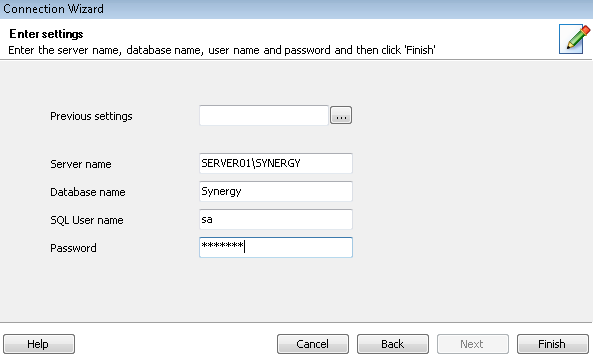
Server Name - this will be the SQL instance name i.e. <server_name>\Synergy
Database Name - type Synergy
SQL User Name - this is always sa unless otherwise stipulated if using SQL Enterprise Edition and not SQL Express Edition
Password - the default is either 'Synergy2008' for SQL2008 R2 edition, or 'Synergy2012' for SQL 2012, or 'Synergy2014' for SQL2014 Express edition.
Complete the following steps:

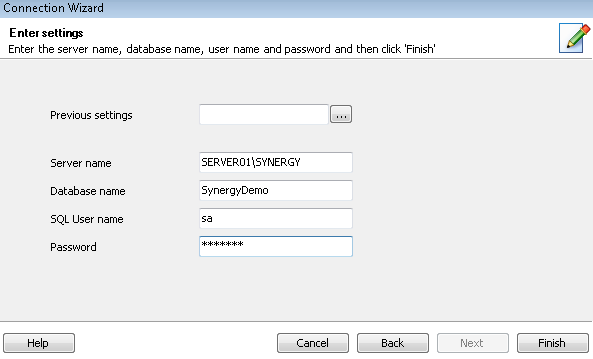
Server Name - this will be the SQL instance name i.e. <server_name>\Synergy
Database Name - type SynergyDemo (no spaces)
SQL User Name - this is always sa unless otherwise stipulated if using SQL Enterprise Edition and not SQL Express Edition
Password - the default is either 'Synergy2008' for SQL2008 R2 edition, or 'Synergy2012' for SQL 2012, or 'Synergy2014' for SQL2014 Express edition.
Tips:
Looking for more help? Try reviewing the following topics: View Topics
© 2019 Total Synergy Pty Ltd